With the increased popularity of "Web Browsing," HTML version 2 may be the most universally supported file format for document interchange. Nonetheless, HTML formatting features are not always "rendered" in a consistent way by the many browser softwares in use today. We, at CONNOTECH, wanted to put information on our Web site with the greatest likelihood that any browser would produce a predictable view of the original contents. To do so, we chose to support a subset of the HTML 2 functions that we found most widely supported.
We created the WP6x2HTM utilities to fill the gap between WordPerfect 6.1 for DOS and the HTML format without leaving the OS/2 environment.
This document serves as an example for the WP6x2HTM utilities it describes. When a specific feature is not needed for the document itself, it is illustrated by an example in the appendix. To fully benefit from those examples, it may be required to have the original WordPerfect file, as well as the HTML version.
The user prepares a WP 6.x file (the original file) that is then
translated first into an ASCII intermediate format, and then into the HTML
format. The program names for these two conversion steps are
respectively
wp2html, and
crehtml. Type the program name followed by a question mark (?) on the command
line prompt to obtain the exact parameter syntax.
The images associated with an original file must be in the .GIF
format. With the
pcl2gif program (part of the WP6x2HTM utilities), this can be anything that
Wordperfect 6.x can print on a physical page using an HP Laserjet
printer in graphics mode (graphics, tables, specially-formatted text). The
pcl2gif program turns captured printer output into black & white image in
the .GIF format. The captured printer output must have been produced
for an HP PCL printer (e.g. HP LaserJet Series II) using raster
graphics. This condition is easily met by 1) selecting the appropriate
printer in Wordperfect, 2) setting "prompt for filename" as the
printer port, and 3) selecting "print job graphically" when
printing a document that will be converted to .GIF by the
pcl2gif program.
Discipline is imposed by the WP6x2HTM utilities! The original file must follow a set of formatting rules that are covered by the rest of this document. This set of rules is a direct consequence of intrinsic limitations of the HTML version 2 language. For instance, tables are not supported (except as an image associated with a file).
Do not allow Undo (in the environment setup).
It is usually recommended to put relative file names for hyperlinks and images. This facilitates moving a set of files from one directory to another, or from one Internet server address to another. In WordPerfect for DOS, the relative file names are based on the "Current Dir" indicated on the file open window. This current directory is temporarily set by the File Manager menu (key F5), but it is not kept within a WP document. To permanently set the current directory, the user must change the WP setup, location of files, directory for documents.
A user inconvenience comes from the fact that WordPerfect copy/paste
includes character attributes (e.g. bold) that are inherited from the
current paragraph style. To keep documents "clean", it is
recommended to delete codes such as
[Ignore:Bold
 On]
.
Some characters are removed from file names and hypertext anchor names. This includes notably " & < and >.
With the exception of the table of contents, all text in a document should have a paragraph style chosen from the list given below. The printable characters embedded in the paragraph style definitions are ignored in the conversion process (e.g. the bullet in front of an unnumbered list item). It is possible to vary the definition of these styles: their names are the important characterisitcs. One would expect the styles to render the text in WordPerfect very close to a browser view, but this need not be the case.
The required styles are provided in a style library called
htmstyle.sty. It can be merged to an existing WP document with the "Layout,
Styles, Retrieve" menu option. It can also be sused as a starting
point for a new WP document.
html_list is used for the numbering. See an
example of its
use.
html_list is used for the numbering. See an
example of its
use.
fixed spacing
 font
.
In the conversion process, any graphics box that has "image on disk" as a contents is turned into the HTML image tag construct (<IMG ... >). The file name extension is forced to .GIF, but otherwise the file name is taken as such. This assumes that images are related to the document that refers to them (there is no specific support for absolute reference to an image on the web).
WordPerfect 6.1 does not support the .GIF format. It is suggested to
create a WP-compatible representation of the same image as the .GIF
file of interest (e.g. with the Windows bitmap .BMP format) and use this
alternate representation in the WP original document. The companion
pcl2gif utility works just like that: it creates a .BMP and a .GIF file at
once, with identical black and white raster graphics contents. The
location of the .BMP file must follow the WP setting for "Location of
Files", "Graphics Files." The location of the .GIF file
must follow the HTML rules for relative image file specifications.
See an
example.
The WP image caption (legend) is turned into the HTML attribute ALT (for alternate text to be displayed when the image is not loaded by the browser).
If the horizontal alignment is to the right, this characteristic is conveyed to the HTML generated file. Otherwise, left image alignment is specified.
Depending on the browser characteristics, the text may wrap around the image. We found that a break character (e.g. using the WP <BR> open style, see next section) turns off text wrapping around the image, if inserted immediately after a WP graphics box.
The document title must be entered in the Document Summary field name "Descriptive Name".
The HTML tag <ISINDEX> is inserted in the document header if the keyword ISINDEX appears in the WP Document Summary field called "Keywords".
Paragraph justification is supported (right, left, center). See examples for center and right justification.
Use the open style <BR> to insert a break character (return to left margin without triggering a new paragraph). See an example.
Empty vertical space is redered from the HTML construct <P> </P> (e.g. when an empty normal paragraph is encountered). See example.
Any WP graphic line that is of horizontal orientation turns into the HTML <HR> construct (horizontal rule). In the conversion process, a graphic line within a paragraph is delayed at the end of paragraph. Here is a hint: to have the same visual effect in WP as in the converted HTML document, put the graphics line in its own paragraph having no paragraph style. See the example below.
As expected:
Special hypertext links are identified by special file names. When such a special file name is recognized, the bookmark field is used in the generated hypertext link, and a standard string is prefixed.
When creating an hypertext to the web, the length limitation on WP bookmarks forced us to devise the following macro mechanism. Any single-line field in the WP document summary can be used as a placeholder for a macro expansion string. The corresponding macro names are predefined below. An undefined macro is not replaced. A macro with an empty expansion expansion string is not replaced. Macros do not nest.
WP Summary Field Name     WP6x2HTM Macro Name
---------------------     -------------------
Account                   %ACCNT%
Attachments               %ATTACH%
Author                    %AUTH%
Authorization             %AUTHOR%
Blind Copy                %BLIND%
Carbon Copy               %CC%
Category                  %CAT%
Checked By                %CH%
Client                    %CLI%
Department                %DPT%
Descriptive Name          %TITLE%
Descriptive Type          %TYPE%
Destination               %DEST%
Disposition               %DISP%
Division                  %DIV%
Document number           %NUMB%
Editor                    %ED%
Forward To                %FORW%
Group                     %GR%
Keywords                  %KEY%
Language                  %LANG%
Mail Stop                 %MS%
Matter                    %MATTER%
Office                    %OFF%
Owner                     %OWN%
Project                   %PRJ%
Publisher                 %PUB%
Received From             %FROM%
Recorded By               %REC%
Reference                 %REF%
Revision number           %REV%
Section                   %SECT%
Security                  %SECU%
Source                    %SRC%
Status                    %STAT%
Subject                   %SUBJ%
Telephone number          %TEL%
Typist                    %TYPIST%
Version number            %VERS%
For instance, if the Editor field in the WP document summary is set to
mycompany.com and an hypertext is created with file reference to
SPECIAL:MAILTO with a bookmark reference to
info@%ED%, the defintive web reference will be
mailto:info@mycompany.com.
References are converted to HTML links to corresponding targets. See example.
When a WordPerfect table of contents is encountered, it is automatically converted into a table of contents with links to appropriate HTML anchors within the document. This very document's table of contents is so constructed.
French accents: ÀàÂâÇçÉéÈèÊêËëÎîÔôÙùÛûÜü
Typographical symbols: ·(··)º«»§¶(""")
Mahematical symbols: °±¹²³µ(µ)×(×)÷(÷÷)¦¬
Comercial symbols: ©¢¤¥®
Here is the complete translation table:
{{1,23,"B"}
,{1,24,"K"}
,{1,25,"J"}
,{1,26,"A"}
,{1,27,"a"}
,{1,28,"Â"}
,{1,29,"â"}
,{1,30,"A"}
,{1,31,"a"}
,{1,32,"À"}
,{1,33,"à"}
,{1,34,"A"}
,{1,35,"a"}
,{1,36,"AE"}
,{1,37,"ae"}
,{1,38,"Ç"}
,{1,39,"ç"}
,{1,40,"É"}
,{1,41,"é"}
,{1,42,"Ê"}
,{1,43,"ê"}
,{1,44,"Ë"}
,{1,45,"ë"}
,{1,46,"È"}
,{1,47,"è"}
,{1,48,"I"}
,{1,49,"i"}
,{1,50,"Î"}
,{1,51,"î"}
,{1,52,"I"}
,{1,53,"i"}
,{1,54,"I"}
,{1,55,"i"}
,{1,56,"N"}
,{1,57,"n"}
,{1,58,"O"}
,{1,59,"o"}
,{1,60,"Ô"}
,{1,61,"ô"}
,{1,62,"O"}
,{1,63,"o"}
,{1,64,"O"}
,{1,65,"o"}
,{1,66,"U"}
,{1,67,"u"}
,{1,68,"Û"}
,{1,69,"û"}
,{1,70,"Ü"}
,{1,71,"ü"}
,{1,72,"Ù"}
,{1,73,"ù"}
,{1,74,"Y"}
,{1,75,"ÿ"}
,{1,76,"A"}
,{1,77,"a"}
,{1,78,"D"}
,{1,79,"d"}
,{1,80,"O"}
,{1,81,"o"}
,{1,82,"O"}
,{1,83,"o"}
,{1,84,"Y"}
,{1,85,"y"}
,{1,86,"D"}
,{1,87,"d"}
,{1,88,"P"}
,{1,89,"p"}
,{1,90,"A"}
,{1,91,"a"}
,{1,92,"A"}
,{1,93,"a"}
,{1,94,"A"}
,{1,95,"a"}
,{1,96,"C"}
,{1,97,"c"}
,{1,98,"C"}
,{1,99,"c"}
,{1,100,"C"}
,{1,101,"c"}
,{1,102,"C"}
,{1,103,"c"}
,{1,104,"D"}
,{1,105,"d"}
,{1,106,"E"}
,{1,107,"e"}
,{1,108,"E"}
,{1,109,"e"}
,{1,110,"E"}
,{1,111,"e"}
,{1,112,"E"}
,{1,113,"e"}
,{1,114,"G"}
,{1,115,"g"}
,{1,116,"G"}
,{1,117,"g"}
,{1,118,"G"}
,{1,119,"g"}
,{1,120,"G"}
,{1,121,"g"}
,{1,122,"G"}
,{1,123,"g"}
,{1,124,"G"}
,{1,125,"g"}
,{1,126,"H"}
,{1,127,"h"}
,{1,128,"H"}
,{1,129,"h"}
,{1,130,"I"}
,{1,131,"i"}
,{1,132,"I"}
,{1,133,"i"}
,{1,134,"I"}
,{1,135,"i"}
,{1,136,"I"}
,{1,137,"i"}
,{1,138,"IJ"}
,{1,139,"ij"}
,{1,140,"J"}
,{1,141,"j"}
,{1,142,"K"}
,{1,143,"k"}
,{1,144,"L"}
,{1,145,"l"}
,{1,146,"L"}
,{1,147,"l"}
,{1,148,"L"}
,{1,149,"l"}
,{1,150,"L"}
,{1,151,"l"}
,{1,152,"L"}
,{1,153,"l"}
,{1,154,"N"}
,{1,155,"n"}
,{1,156,"N"}
,{1,157,"n"}
,{1,158,"N"}
,{1,159,"n"}
,{1,160,"N"}
,{1,161,"n"}
,{1,162,"O"}
,{1,163,"o"}
,{1,164,"O"}
,{1,165,"o"}
,{1,166,"OE"}
,{1,167,"oe"}
,{1,168,"R"}
,{1,169,"r"}
,{1,170,"R"}
,{1,171,"r"}
,{1,172,"R"}
,{1,173,"r"}
,{1,174,"S"}
,{1,175,"s"}
,{1,176,"S"}
,{1,177,"s"}
,{1,178,"S"}
,{1,179,"s"}
,{1,180,"S"}
,{1,181,"s"}
,{1,182,"T"}
,{1,183,"t"}
,{1,184,"T"}
,{1,185,"t"}
,{1,186,"T"}
,{1,187,"t"}
,{1,188,"U"}
,{1,189,"u"}
,{1,190,"U"}
,{1,191,"u"}
,{1,192,"U"}
,{1,193,"u"}
,{1,194,"U"}
,{1,195,"u"}
,{1,196,"U"}
,{1,197,"u"}
,{1,198,"U"}
,{1,199,"u"}
,{1,200,"W"}
,{1,201,"w"}
,{1,202,"Y"}
,{1,203,"y"}
,{1,204,"Z"}
,{1,205,"z"}
,{1,206,"Z"}
,{1,207,"z"}
,{1,208,"Z"}
,{1,209,"z"}
,{1,210,"NJ"}
,{1,211,"nj"}
,{1,212,"D"}
,{1,213,"d"}
,{1,214,"L"}
,{1,215,"l"}
,{1,216,"N"}
,{1,217,"n"}
,{1,218,"R"}
,{1,219,"r"}
,{1,220,"S"}
,{1,221,"s"}
,{1,222,"T"}
,{1,223,"t"}
,{1,224,"Y"}
,{1,225,"y"}
,{1,226,"Y"}
,{1,227,"y"}
,{1,228,"D'"}
,{1,229,"d'"}
,{1,230,"O'"}
,{1,231,"o'"}
,{1,232,"U'"}
,{1,233,"u'"}
,{1,234,"E"}
,{1,235,"e"}
,{1,236,"I"}
,{1,237,"i"}
,{1,238,"I"}
,{1,239,"i"}
,{1,240,"O"}
,{1,241,"o"}
,{4,0,"·"}
,{4,1,"·"}
,{4,3,"·"}
,{4,5,"¶"}
,{4,6,"§"}
,{4,9,"«"}
,{4,10,"»"}
,{4,12,"¥"}
,{4,16,"º"}
,{4,19,"¢"}
,{4,20,"²"}
,{4,22,"®"}
,{4,23,"©"}
,{4,24,"¤"}
,{4,26,"³"}
,{4,27,"'"}
,{4,28,"'"}
,{4,29,"'"}
,{4,30,"""}
,{4,31,"""}
,{4,32,"""}
,{4,33,"-"}
,{4,34,"-"}
,{4,50,"-"}
,{4,78,"¹"}
,{6,0,"-"}
,{6,1,"±"}
,{6,2,"<="}
,{6,3,">="}
,{6,5,"÷"}
,{6,6,"÷"}
,{6,7,"\\"}
,{6,8,"÷"}
,{6,9,"¦"}
,{6,10,"<"}
,{6,11,">"}
,{6,12,"~"}
,{6,20,"¬"}
,{6,21,"->"}
,{6,22,"<-"}
,{6,25,"<->"}
,{6,36,"°"}
,{6,37,"µ"}
,{6,39,"×"}
,{6,45,"'"}
,{6,46,"''"}
,{6,56,"=>"}
,{6,57,"<="}
,{6,60,"<=>"}
,{6,75,"|_"}
,{6,76,"_|"}
,{6,77,"<<"}
,{6,78,">>"}
,{6,81," XOR "}
,{6,84," AND "}
,{6,97,"[|"}
,{6,98,"|]"}
,{6,99,"<>"}
,{6,113,"'''"}
,{6,123,"<<<"}
,{6,124,">>>"}
,{6,226,"+"}
,{6,227,"-"}
,{6,228,"="}
,{6,229,"×"}
,{6,230,"/"}
,{6,231,"//"}
,{6,232,"///"}
,{8,0,"ALPHA"}
,{8,1,"alpha"}
,{8,2,"BETA"}
,{8,3,"beta"}
,{8,4,"BETA"}
,{8,5,"beta"}
,{8,6,"GAMMA"}
,{8,7,"gamma"}
,{8,8,"DELTA"}
,{8,9,"delta"}
,{8,10,"EPSILON"}
,{8,11,"epsilon"}
,{8,12,"ZETA"}
,{8,13,"zeta"}
,{8,14,"ETA"}
,{8,15,"eta"}
,{8,16,"THETA"}
,{8,17,"theta"}
,{8,18,"IOTA"}
,{8,19,"iota"}
,{8,20,"KAPPA"}
,{8,21,"kappa"}
,{8,22,"LAMBDA"}
,{8,23,"lambda"}
,{8,24,"MU"}
,{8,25,"µ"}
,{8,26,"NU"}
,{8,27,"nu"}
,{8,28,"XI"}
,{8,29,"xi"}
,{8,30,"OMICRON"}
,{8,31,"omicron"}
,{8,32,"PI"}
,{8,33,"pi"}
,{8,34,"RHO"}
,{8,35,"rho"}
,{8,36,"SIGMA"}
,{8,37,"sigma"}
,{8,38,"SIGMA"}
,{8,39,"sigma"}
,{8,40,"TAU"}
,{8,41,"tau"}
,{8,42,"UPSILON"}
,{8,43,"upsilon"}
,{8,44,"PHI"}
,{8,45,"phi"}
,{8,46,"CHI"}
,{8,47,"chi"}
,{8,48,"PSI"}
,{8,49,"psi"}
,{8,50,"OMEGA"}
,{8,51,"omega"}
The quick brown fox jumps over the lazy dog. The quick brown fox jumps over the lazy dog. The quick brown fox jumps over the lazy dog. The quick brown fox jumps over the lazy dog. The quick brown fox jumps over the lazy dog. The quick brown fox jumps over the lazy dog.
BLOCKQUOTE1: The quick brown fox jumps over the lazy dog. The quick brown fox jumps over the lazy dog. The quick brown fox jumps over the lazy dog. The quick brown fox jumps over the lazy dog. The quick brown fox jumps over the lazy dog. The quick brown fox jumps over the lazy dog.BLOCKQUOTE2: The quick brown fox jumps over the lazy dog. The quick brown fox jumps over the lazy dog. The quick brown fox jumps over the lazy dog. The quick brown fox jumps over the lazy dog. The quick brown fox jumps over the lazy dog. The quick brown fox jumps over the lazy dog.BLOCKQUOTE3: The quick brown fox jumps over the lazy dog. The quick brown fox jumps over the lazy dog. The quick brown fox jumps over the lazy dog. The quick brown fox jumps over the lazy dog. The quick brown fox jumps over the lazy dog. The quick brown fox jumps over the lazy dog.BLOCKQUOTE2: The quick brown fox jumps over the lazy dog. The quick brown fox jumps over the lazy dog. The quick brown fox jumps over the lazy dog. The quick brown fox jumps over the lazy dog. The quick brown fox jumps over the lazy dog. The quick brown fox jumps over the lazy dog.
On top of some empty vertical space.
Below some empty vertical space.
Here is a sample of a compact ordered list:
Here is a sample of a more spaced ordered list:
Here is a preformatted view of the intended visual effect:
    The
    The quick
    The quick brown
    The quick brown fox
    The quick brown fox jumps
    The quick brown fox jumps over
    The quick brown fox jumps over the
    The quick brown fox jumps over the lazy
    The quick brown fox jumps over the lazy dog.
And here is the HTML BLOCKQUOTE1 paragraph sytle with line break characters:
    The

    The quick

    The quick brown

    The quick brown fox

    The quick brown fox jumps

    The quick brown fox jumps over

    The quick brown fox jumps over the

    The quick brown fox jumps over the lazy

    The quick brown fox jumps over the lazy dog.
Here is a preformatted view of another intended visual effect:
The
The quick
The quick brown
The quick brown fox
The quick brown fox jumps
The quick brown fox jumps over
The quick brown fox jumps over the
The quick brown fox jumps over the lazy
The quick brown fox jumps over the lazy dog.
And here is the HTML BLOCKQUOTE1 paragraph sytle with line break characters, hpoefully producing the same effect:
The
The quick
The quick brown
The quick brown fox
The quick brown fox jumps
The quick brown fox jumps over
The quick brown fox jumps over the
The quick brown fox jumps over the lazy
The quick brown fox jumps over the lazy dog.
A link to a web page related to this one.
A link to a bookmark within a web page related to this one.
For comments and suggestion, e-mail to us at info@connotech.com.
Use anonymous ftp to retrieve a file residing on an ftp site.
See an absolutely referenced web page.
Here is an hypertext reference to a cross-reference target, in this case for 2nd item in a numbered list.
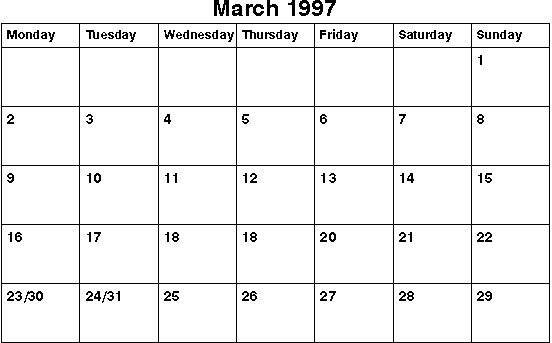
The image below was created with the following procedure:
\TMPMARCH.PCL, and after having requested "print job graphically" and
text and graphics quality set to "draft".
PCL2GIF \TMPMARCH.PCL \HTML\MARCH%1.1d\HTML\MARCH1.GIF and
\HTML\MARCH1.BMP.
MARCH1.BMP as the "image on disk" contents.
[ CONNOTECH home page: http://www.connotech.com/ | about us | web editorial policy | e-mail to: info@connotech.com ]
CONNOTECH Experts-conseils Inc.
9130 Place de Montgolfier
Montréal, Québec, Canada, H2M 2A1
Tél.: +1-514-385-5691
Fax: +1-514-385-5900